The Free-First Newsletter Stack For Agent-Native Teams
How to start a simple owned newsletter before paying for heavier tooling.
You do not need a full newsletter platform to start learning from readers.
You need a way to capture interest, publish useful issues, send them without breaking trust, and record whether the work is worth repeating.
That is a smaller job.
It is also the right first job.
Most early teams make the newsletter decision too big. They compare Substack, beehiiv, Kit, Buttondown, Resend, Postmark, Ghost, WordPress, listmonk, Mautic, and a dozen other paths before they have one issue worth sending.
The better rule is:
Start with the smallest owned loop Own the subscriber record, the issue archive, the unsubscribe path, and the canonical article. Reuse a sender only when sending, deliverability, templates, automation, or team workflow becomes the bottleneck.
That is the free-first newsletter stack Vibegrow is using.
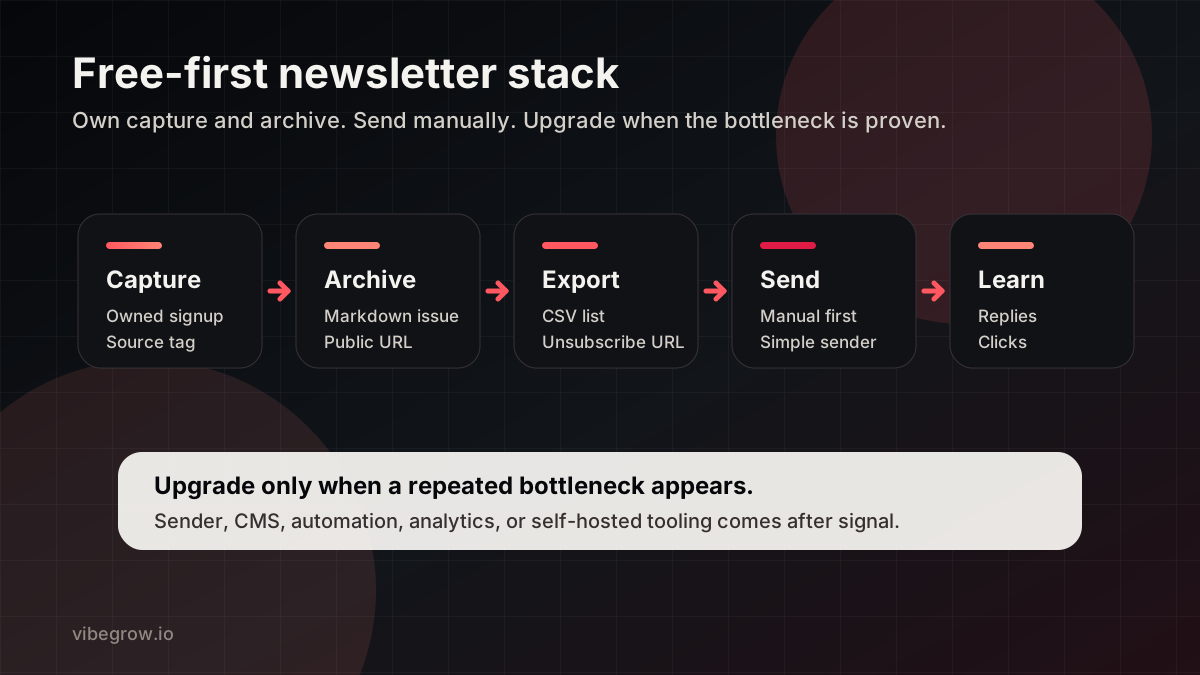
The owned newsletter loop
The actual first stack
The first stack is not glamorous.
| Layer | Free-first choice | Why it is enough |
|---|---|---|
| Capture | Owned signup form on the site | The list starts where the brand lives |
| Store | A simple subscriber table | Email, status, source, timestamps, and consent are enough |
| Archive | Public issue page | Readers can find the issue after it is sent |
| Export | CSV with unsubscribe URLs | Any sender or manual workflow can use it |
| Send | Manual send or simple free-tier sender | Volume is small and learning matters more than automation |
| Measure | Notes and analytics | Replies, clicks, and unsubscribes drive the next decision |
This gives a founder the important pieces without buying a stack too early.
The list is owned. The issue is archived. The unsubscribe path exists. The content can be pasted into a sender. The team can migrate later.
That is enough to start.
What Vibegrow owns
Vibegrow keeps these parts inside the brand system:
- A newsletter page.
- A public issue archive.
- RSS for people who prefer feeds.
- Signup and unsubscribe paths.
- Subscriber export for moving to another sender.
- Source attribution on signup.
- A basic record of what earned replies, clicks, or unsubscribes.
That sounds more complicated than it is. The important part is that each piece has a boring job.
The site captures the subscriber. The public issue becomes the archive. The export path gives the sender the latest list. The unsubscribe URL keeps the manual send honest. The results decide whether the next upgrade is earned.
Why manual send first?
Manual sending is not the final state.
It is the cheapest honest first state.
If ten people are on the list, a paid automation stack will not make the issue more valuable. It can only make the operation feel more mature than it is.
Manual send also keeps the early questions visible:
- Did anyone reply?
- Did anyone click?
- Did anyone unsubscribe?
- Did anyone ask for the next issue?
- Did sending take long enough to slow publishing?
- Did the team make a mistake merging unsubscribe links?
Those answers matter more than the sender logo.
Manual drag is the upgrade signal Move to a dedicated sender when manual export, merging, templates, deliverability, scheduling, segmentation, or compliance review slows the publishing loop more than once.
Where open-source fits
Open-source and self-hosted tools are useful when the team has the appetite to own operations.
listmonk can be a good fit when the need is a self-hosted newsletter and mailing-list manager. Mautic can be a good fit when the need has grown into broader marketing automation.
Those are not automatically simpler than the owned newsletter/export loop. They move the work from monthly software spend to setup, hosting, monitoring, deliverability, backups, and maintenance.
Use them when that trade is worth it.
For an early founder, the right first question is not "which open-source tool can replace a newsletter platform?" The right question is "what do we need to learn before tooling matters?"
Where paid senders fit
Paid or managed senders are useful when they remove a real bottleneck.
| Tool class | Useful when | Keep owned |
|---|---|---|
| Newsletter platforms | The issue needs editor workflow, templates, growth tools, referrals, or audience features | Canonical article, list export, source archive |
| Developer email APIs | The team wants code-owned sending, templates, and delivery logs | Subscriber source, issue source, unsubscribe rules |
| Publishing platforms | The newsletter is also a public media surface | Canonical brand site and migration path |
| Marketing automation | Segmentation, nurture, scoring, and behavior triggers matter | Consent, message strategy, measurement rules |
This is where tools like Buttondown, Kit, beehiiv, Substack, Resend, Postmark, Ghost, WordPress, listmonk, or Mautic can make sense. The right choice depends on the bottleneck.
Do not pick the tool first. Name the bottleneck first.
The paid-later triggers
Upgrade when one of these is true:
- Manual sends have caused mistakes or delays more than once.
- Deliverability is becoming a real constraint.
- The list needs segmentation or different issue types.
- Non-dev contributors need to draft, review, or send without repo access.
- Templates, scheduling, or personalization would save recurring work.
- The team needs better send analytics to decide what to repeat.
- Compliance review needs a more controlled sending workflow.
- A channel has proven qualified demand and deserves a repeatable campaign.
If none of those are true, keep the stack simple.
The copyable checklist
For a small team, the first version can be this:
- Create one newsletter page.
- Add one signup form.
- Store email, source, status, and timestamps.
- Publish every issue to a public archive.
- Link back to the most relevant article.
- Export active subscribers to CSV.
- Merge
{{unsubscribe_url}}before sending. - Send manually or with the simplest sender available.
- Record replies, clicks, unsubscribes, and recurring friction.
That is not a forever stack. It is a learning stack.
The goal is to avoid paying for sophistication before the message has earned it.
Copy the newsletter loop Start with owned capture, a public issue archive, CSV export, and an unsubscribe path. Upgrade when the bottleneck is real.